Introduction To HTML

Before beginning the article, I would like to mention that I am currently learning web development, and through this article, I will be sharing my experiences of what I have learned. So, let's get started.
HTML, which stands for Hyper Text Markup Language, is the backbone of web development. It provides a structure to our web pages and determines how they will appear. To create a website, it is essential to learn about the fundamental elements of HTML and how they are used to display content.
Inline And Block Elements
Inline elements are those elements that do not begin on the new line, They fall into the normal flow of the line they only maintain the width of their content span tag and anchor tag is the example of inline elements
Block elements are the elements that take the block of space in the code block elements always begin with the new line div tag, paragraph tag are the example of block elements.
Tags In HTML
The use of less-than and greater-than angle brackets surrounding an element creates what is known as a tag. Tags most commonly occur in pairs of opening and closing tags.
<p>, <h1>, <h2>, <h3>, <h4>, <h5>, <h6>, <strong>, <em>, <abbr>, <acronym>, <address>, <bdo>, <blockquote>, <cite>, <q>, <code>, <ins>, <del>, <dfn>, <kbd>, <pre>, <samp>, <var> and <br>
Attributes in HTML
Attributes are the properties that are used to provide additional information about the elements most common examples of attributes are classes and id which are used to identify the particular elements
<a href = "https://youtube.com">
Here as you can see that "href" is an attribute for the anchor tag which is used to provide the Hyperlink.
Structure Of HTML
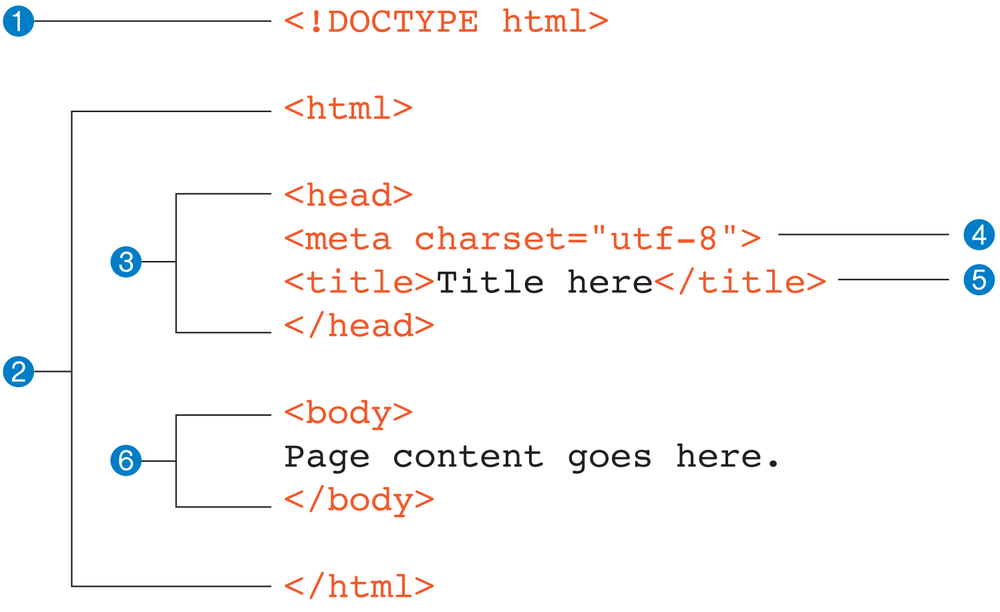
<!DOCTYPE HTML>: It informs web browsers which version of HTML is being used and is placed at the very beginning of the HTML document.
<HTML>: This is also known as the root tag it contains all the other tags.
<head>: It identifies the top of the document, including any metadata (accompanying information about the page). The content of the <head tag doses not displayed on the webpage.
<meta>: Metadata in HTML refers to the information that describes and provides additional context about a webpage. This information is not displayed on the webpage itself but is instead used by web browsers, search engines, and other applications to understand and process the webpage.
<Title>: This tag holds the title of the page.
<body>: This tag contains all the content that displays on the web page.
How to save the HTML File
Use any editor of your choice and save your file with the extension '.html', for example, 'hasnode.html'.
Thank you for reading and I hope this blog has been informative and helpful. If you have any questions or comments, please feel free to share them below.


